
A mod package is a folder, or that folder zipped into one .srw64mod file. It holds data only, never code. When a package is enabled, the game uses its contents in place of the matching parts of the original; wherever no package says otherwise, everything is the original.
Music and battle voices, numbers, names, portraits, map icons, campaigns, story events and language packages take effect: replacing songs, choosing which song a pilot or unit fights to and voicing the battle lines, as described in Music mods; changing the numbers of units, pilots and weapons, as described in Number mods; and renaming, new portraits and map icons, as described in Name, portrait and map icon mods; events added to the original stages, characters joining and story branches changing, as described in Story mods; and campaigns chained from stages you arrange, as described in Campaign mods; and adding a reading language or replacing an existing one’s text, as described in Language package mods. Other art will follow; the package format already has a place for them.
Mods need version 0.5.1 or later; everything beyond music and terrain ranks needs 0.5.2, story mods and language packages need 0.5.3, and the Switch needs 0.5.3.1.
Installing
- Open the mod manager: click “MOD” in the bottom-right corner of the title screen, or open the settings and click “MOD” on the General page.
- Drag the
.srw64modfile (a.zipor a package folder works too) into the game window. The game installs it in the background, says so at the top of the screen and opens the Installed page. - Or click “Open folder” and put the package file straight into the MOD folder; it is installed the next time you open the mod manager. From 0.5.4 (on the Switch, 0.5.3.1), a package file’s extracted folder can go there too, under any name.
Installing a new version of a package replaces the old one. The old version, and any package you remove, goes into .trash inside the MOD folder rather than being deleted.
On Android, put the package file in mods/ inside the Marchwind64 folder under Documents (the Files app): it installs when the game starts or the MOD page opens. Or press Install from file on the MOD page and pick it.
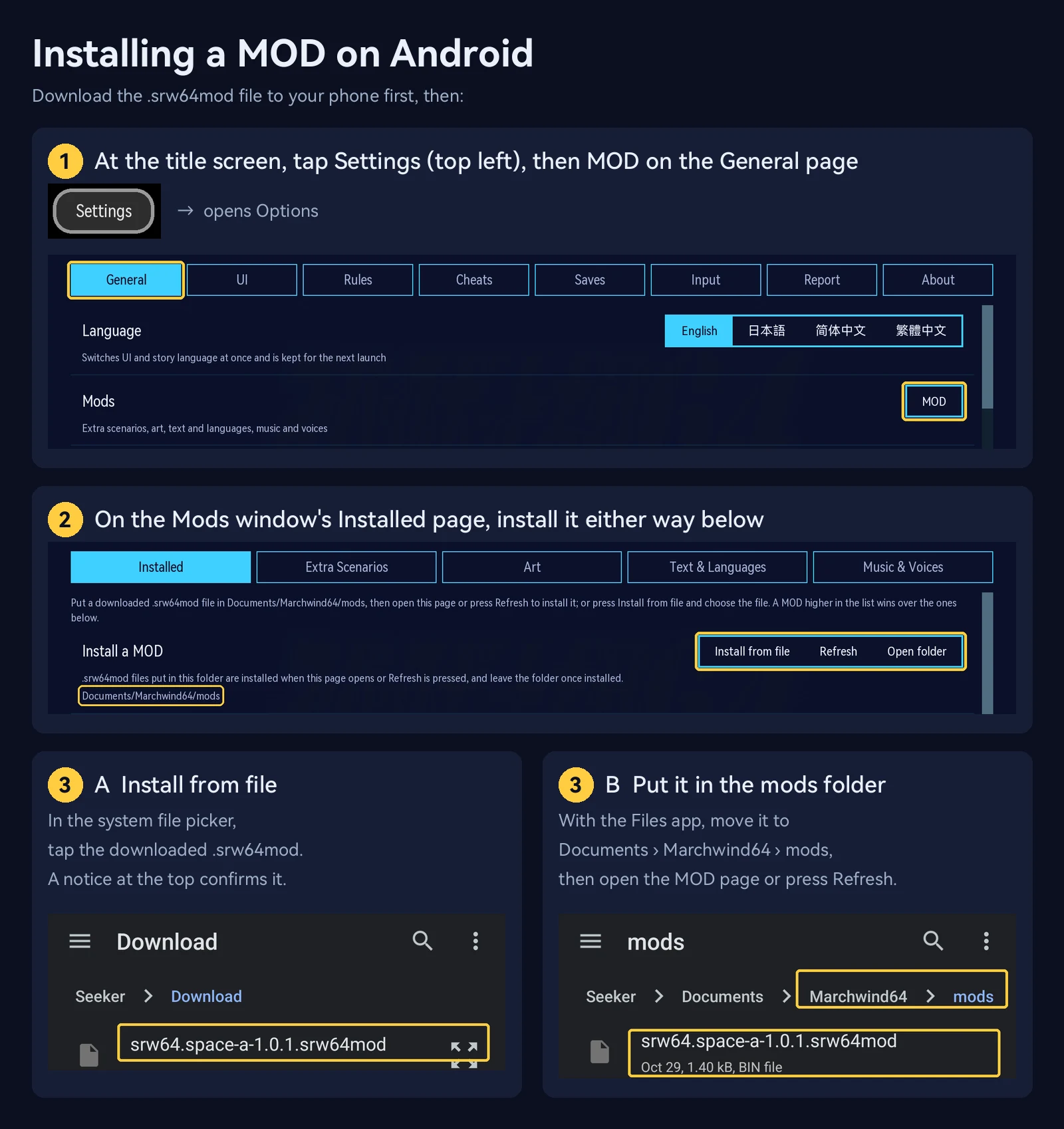
On the Switch, put the package file (or its extracted folder) in /switch/Marchwind64/mods/ on the SD card with a card reader or FTP: it installs when the game starts or the MOD page opens. A large voice package shows its progress on the loading screen and can take a few minutes.
Managing
The Installed page lists each package’s name, version, authors, contents and status. You can turn a package on or off, or remove it (removal asks you to confirm).
- A package higher in the list overrides the ones below it: if two packages replace the same song, the upper one’s is used.
- A package that depends on another is placed above it automatically. If a dependency is missing, too old or turned off, the page says so and the package stays off for now.
- If a package needs a newer version of the game, the page says that too.
Making a package
The easiest way to make a music package is the website’s BGM MOD maker, which writes the files below for you. Read on if you want to make one by hand, or to know what is inside.
What a package holds
mod.json        the package's details (required)
audio/          music and voices
campaign/       additional campaigns
art/            art
dialogue/       dialogue and languages
data/           numbers
Include only the folders you use. To publish, zip the whole folder and change the extension to .srw64mod. mod.json can sit at the top of the archive or inside its single top-level folder.
mod.json
{
  "schema": "srw64.mod.v1",
  "id": "yourname.bgm",
  "version": "1.0.0",
  "name": { "zh-Hans": "我的 BGM", "en": "My BGM", "ja": "マイ BGM" },
  "description": { "en": "New battle themes." },
  "authors": ["yourname"],
  "license": "CC-BY-4.0"
}| Field | Meaning |
|---|---|
schema |
Always srw64.mod.v1 |
id |
The package’s unique name: letters, digits and . _ -, up to 64 characters. “author.name” is a good pattern. Don’t change it once released |
version |
The version, written like 1.0.0 |
name |
The name shown: one string, or one per language (zh-Hans, zh-Hant, en, ja, and the languages of installed language packages; Traditional Chinese falls back to Simplified, others to their fallback, then Japanese) |
description |
Optional; a description, written like name |
authors |
Optional; a list of authors |
license |
The license, which must allow passing the package on: CC-BY-4.0, CC-BY-SA-4.0, CC-BY-NC-4.0, CC-BY-NC-SA-4.0, CC0-1.0, MIT or GPL-3.0-or-later |
game |
Optional; the game version needed, such as ">=0.5.1" |
requires |
Optional; packages this one needs, such as { "someone.base": ">=1.0" } |
optional |
Optional; packages used together with this one when present, written like requires |
conflicts |
Optional; packages that cannot be on at the same time, such as { "someone.old": "*" } |
A version requirement is * (any version) or a few space-separated conditions, such as ">=1.0 <2". Fields the game does not know are treated as errors, so don’t add your own.
Checking
tools/mods/validate.py in the source repository checks a package by the same rules as the game and lists every problem:
python3 tools/mods/validate.py yourname.bgm-1.0.0.srw64modCopyright
Everything in a package must be yours to pass on. A package made from material such as the original anime songs is for your own use only; don’t publish it, and we won’t list such packages.