
With the optional HD pack installed, you can switch between the original and HD graphics at any time. This post covers how each type of artwork was made and brought into the game. In the comparisons below, the original is enlarged pixel for pixel on the left, with HD on the right.
Three principles guided the work:
- Follow the original composition. Redrawn and upscaled images are aligned to the original outlines, positions and dimensions, with added detail kept within the source composition.
- Replace assets at the rendering layer. Both modes use the same game logic, saves and rules.
- Generate assets from your ROM where possible. Window frames, the BANPRESTO logo and GAME OVER are generated at run time from your own ROM, so their original data is not included in the HD pack.
Four ways to render the HD assets
A finished image or model reaches the screen through one of four paths:
| Path | How it works | Used for |
|---|---|---|
| Whole-image drawing | The game still draws a picture as small tiles. The host identifies the picture, suppresses those tiles and draws one HD image at the same time and depth | Portraits, intermission backgrounds, tactical maps, the title, unit and battle sprites |
| Texture replacement | A small texture is replaced using its RT64 renderer hash. These hashes can be computed offline from the ROM, without running the game | World map surfaces, space objects, dialogue and HUD frames, map unit icons, battle ground |
| Native models | The original 3D display list is recognised and skipped, and a rebuilt model is drawn in its place | Ships, landmarks and the location marker on the world map |
| Native text | Text embedded in the original images is typeset in the current language | Title menu, chapter cards, prologue, ending, credits |
Large pictures in the original are made from dozens of small textures. Drawing a whole HD image avoids the visible joins that can appear when those textures are replaced individually.
Character portraits
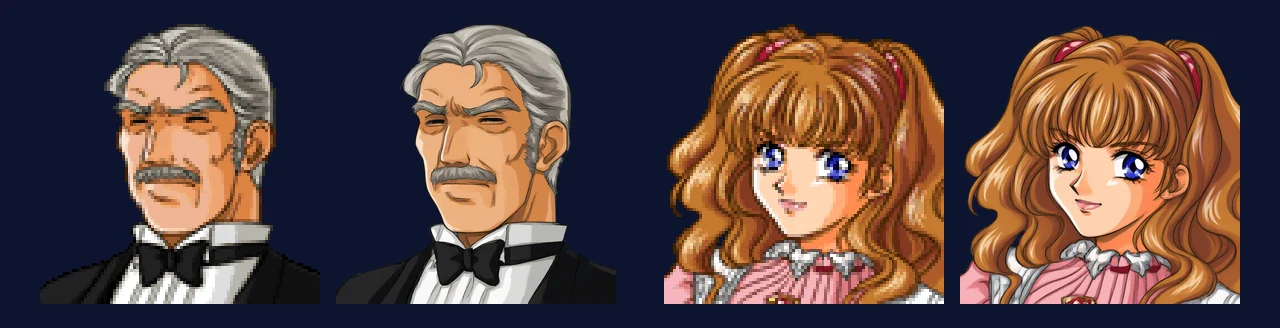
Left: original, 96×96. Right: HD, 768×768.
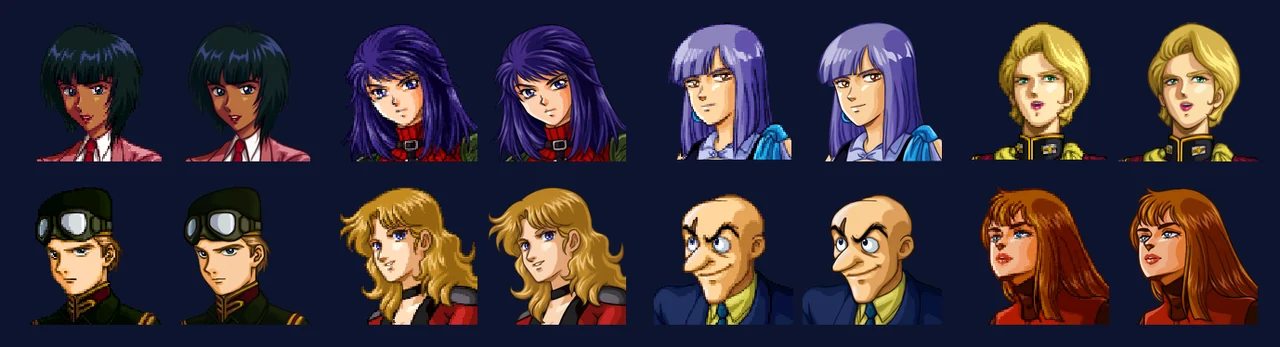
Eight more portraits, original left, HD right in each pair.
- Original: 300 portraits of about 96×96, with 64 colours each.
- Generation: Alibaba Cloud Qwen, qwen-image-3.0. Each request used four portraits in a 2×2 grid, with a grey background and 6× pixel enlargement: 75 requests, costing about 15 yuan (around 2 US dollars). Two earlier approaches did not work: a green-screen background caused the model to enlarge every cell, and 3×3 grids left the cells too small.
- Alignment: the model changed cell sizes by 3–10% and shifted them by up to 7 pixels. Each cell was aligned using a least-squares affine fit over 32-pixel blocks, then resampled to an 8× master.
- Matting: the outline is held within ±1.5 original pixels of the source outline. Where the model stopped short of the frame edge (130 of 300), the edge colour was extended to the boundary. The median overlap (IoU) with the original outline is 0.991.
- Edge cleanup: early mattes stored transparent pixels as black. The renderer filters without premultiplied alpha, which produced a dark fringe. Filling transparent pixels with the nearest solid colour, then scaling colour and alpha separately, removed it.
- Result: 304 images at 768×768, rendered through whole-image drawing.
Intermission backgrounds
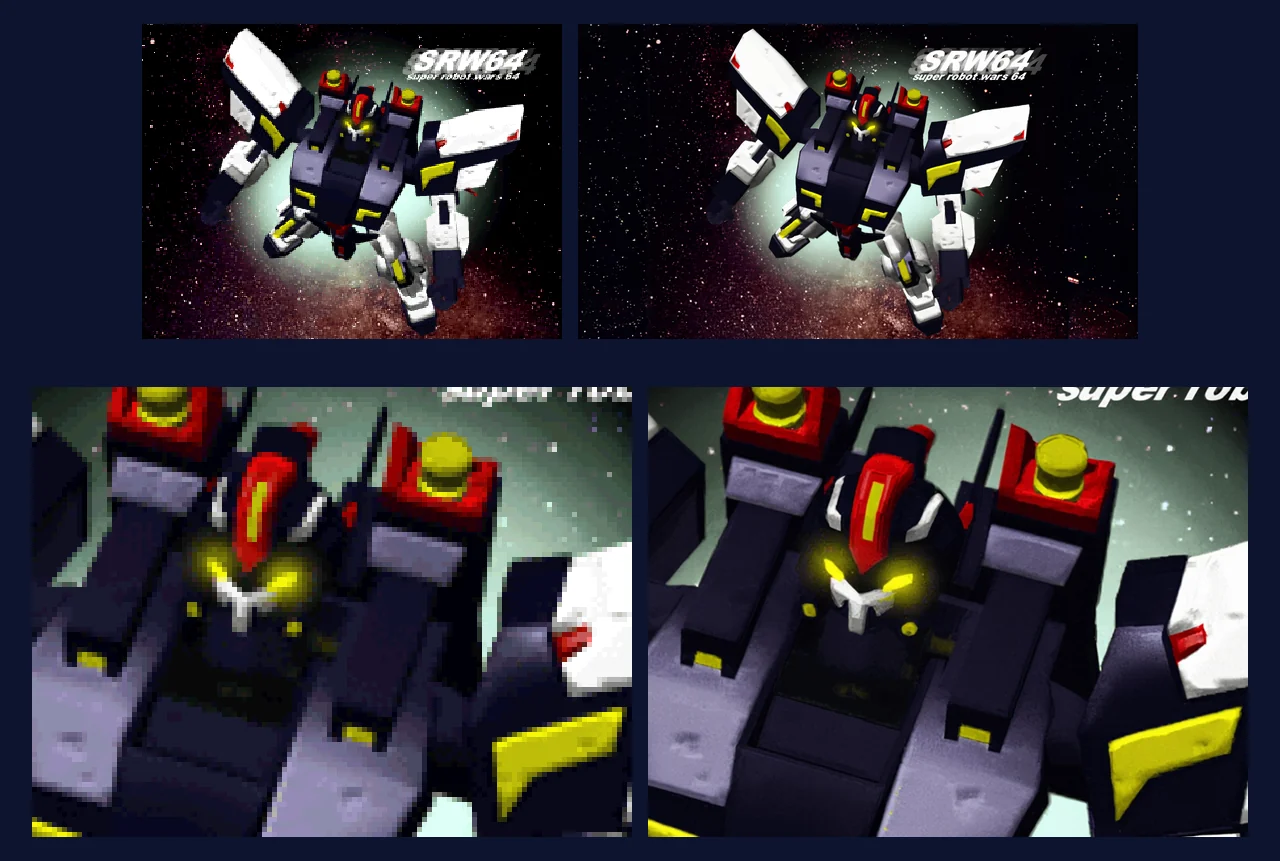
Top: the whole picture, original 320×240 on the left and HD widened to 16:9 on the right. Bottom: the same area at 5×, original left, HD right.
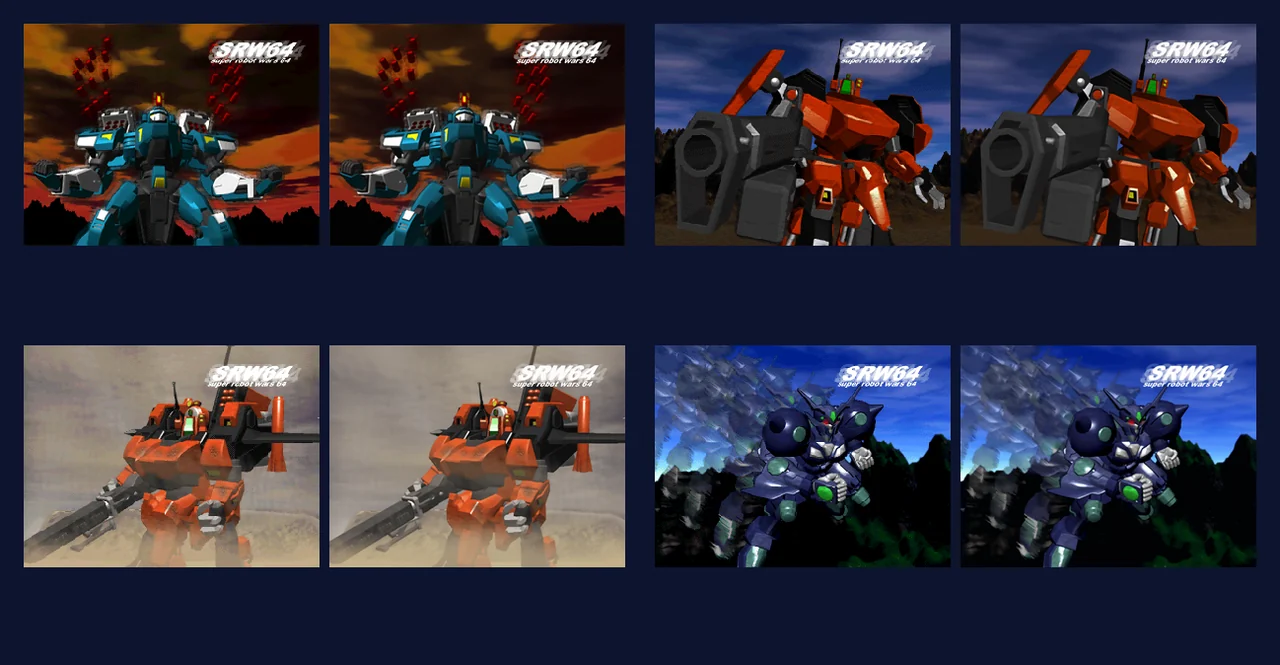
Four more intermission backgrounds, showing the 4:3 area. Original left, HD right in each pair.
- Original: 8 images of 320×240, each with a bright and a dark palette.
- Generation: redrawn with Qwen qwen-image-3.0-pro and aligned at 1920×1440. The dark versions are derived from the bright ones using a 17³ colour lookup table fitted to the two ROM palettes. This gives errors of 1.2–2.6 colour levels, compared with 3–23 for a simple ×0.75 adjustment.
- Widescreen: Alibaba Cloud Wanx (wanx2.1-imageedit) was then used to extend both sides to 2560×1440.
- Result: 16 images plus a starfield, rendered through whole-image drawing.
Story world map
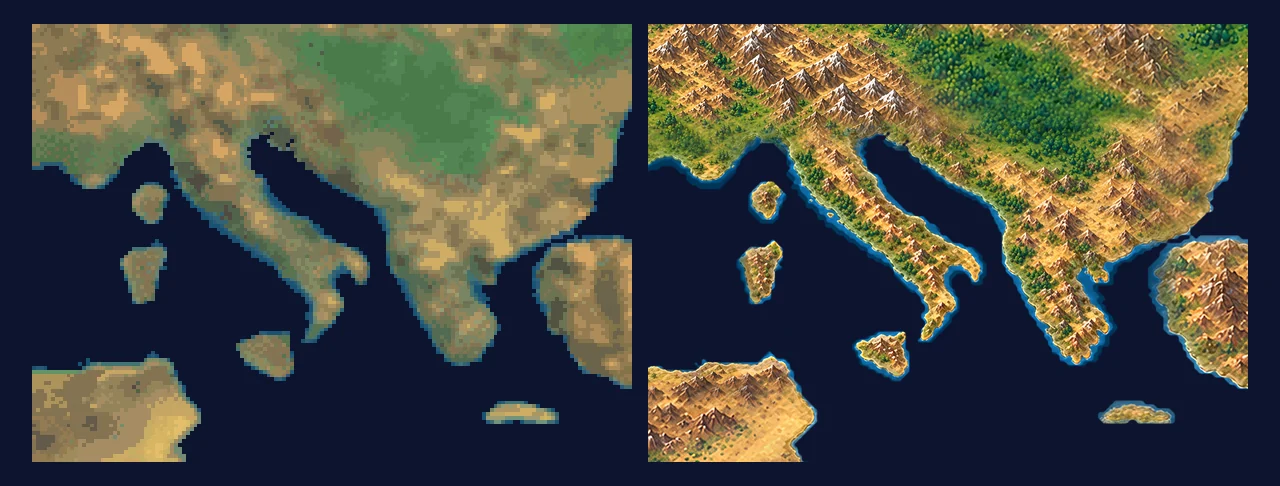
Left: original Europe (the Mediterranean). Right: HD.
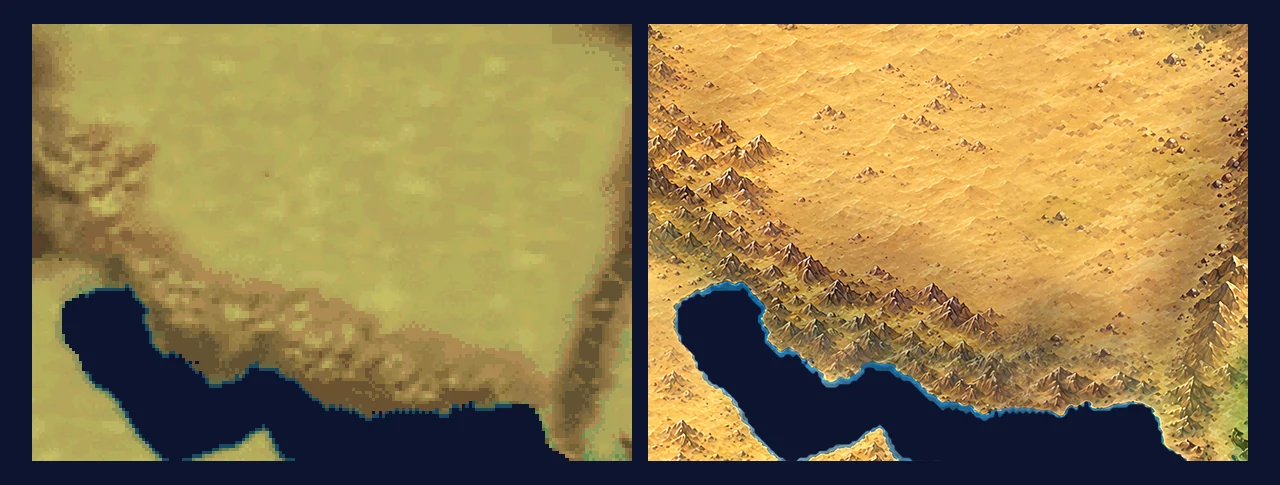
Central Asia (around the Caspian Sea), original left, HD right.
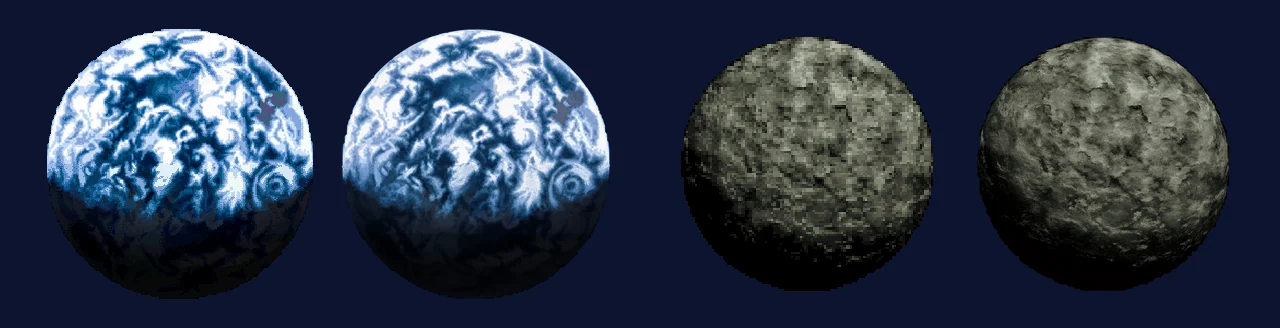
The Earth and the Moon in the space region, original left, HD right in each pair.
- Original: 64×64 4-bit surface tiles for the whole Earth, Europe, Central Asia, North America and space.
- Generation: after several rounds with Qwen, the results still did not fit the source artwork, so all four surfaces were redrawn with OpenAI’s image model through Codex. Each region was painted as a whole base, then in 3:2 windows for detail. The windows were blended with more weight given to pixels further from each window’s inner edge, and coastlines were masked to the original land and sea boundaries.
- Tiling fixes: the correct row pitch was 600, not 611; the wrong value left a seam. A purple fringe along the coasts also needed separate cleanup.
- Close-ups: when the story zooms to a location, one original pixel covers 19–30 screen pixels. We made dedicated close-up windows for 19 frequently visited locations.
- Result: 213 textures of 512×512 (8× the original), applied through texture replacement. Space uses 27 textures from Qwen, and the starfield is drawn as a whole image.
Ships, landmarks and the world map marker
The ships flying over the story world map, the landmarks in space and the yellow location marker use simple 3D models in the original. The HD pack replaces them with rebuilt models. The screenshots below were captured in game in 0.3.5: first in HD, then at the same moment with the original graphics.
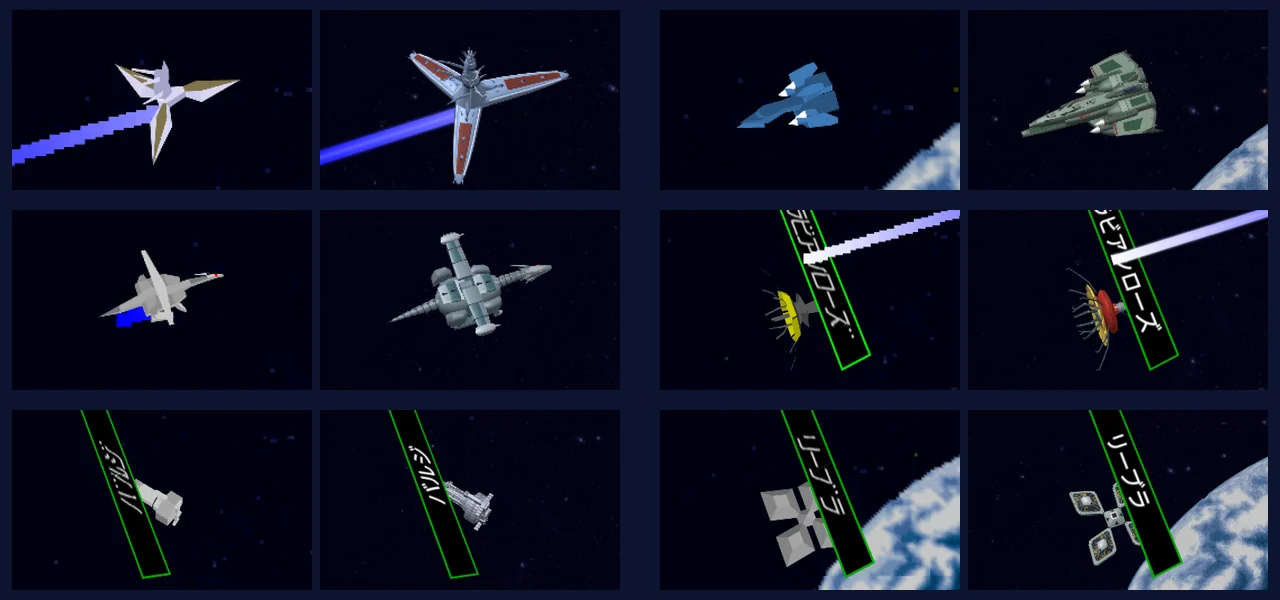
Original left, HD right in each pair. Left to right, top to bottom: Gran-Garan, Goraon, Gandor, La Vie en Rose, Barge, Libra.
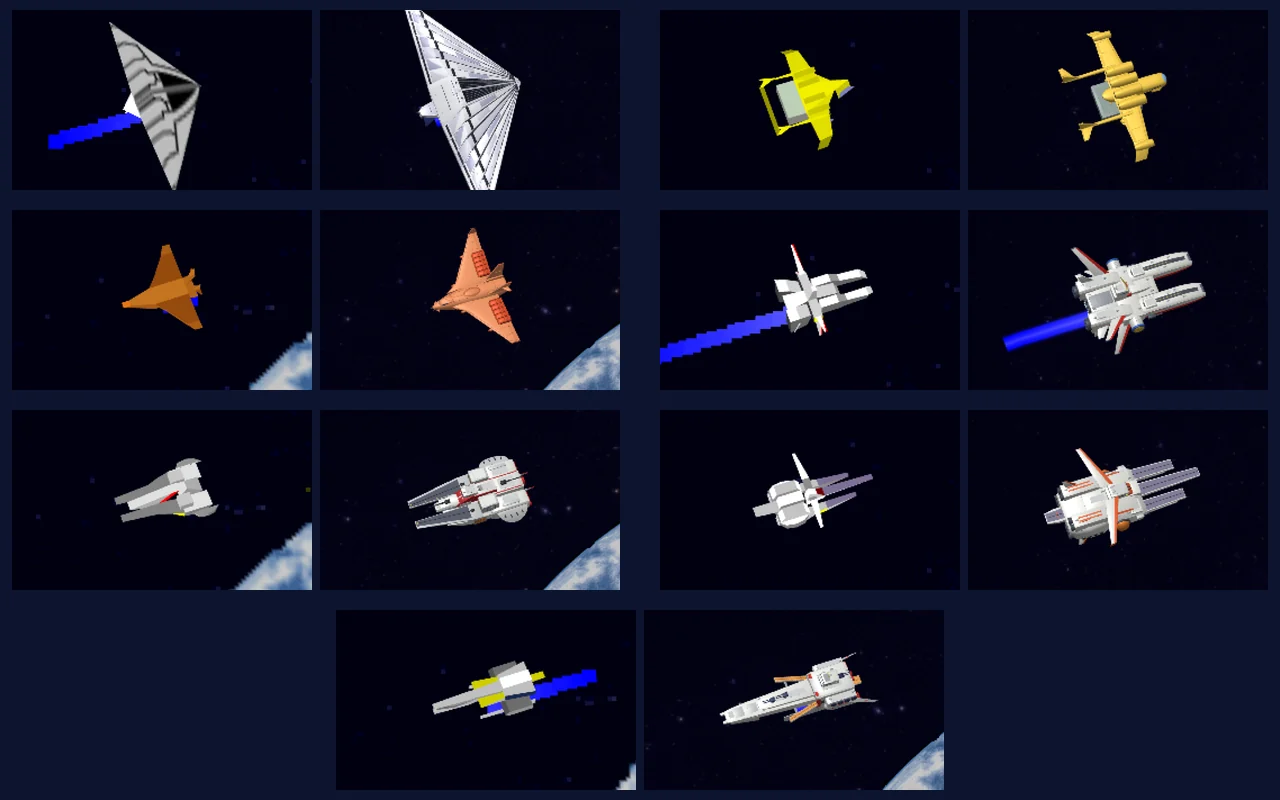
Peacemillion, Medea, Audhumla, Albion, Argama, Nahel Argama, Ra Cailum.
- Ships: 13 ships were rebuilt in Blender using scripts and official designs as references. Each has 8,000 to 21,000 faces, compared with 4 to 330 in the originals. Trails are drawn as shader ribbons.
- Name plates: ships with a name plate, such as Libra and Barge, have it typeset in the current language. These screenshots use the Japanese interface.
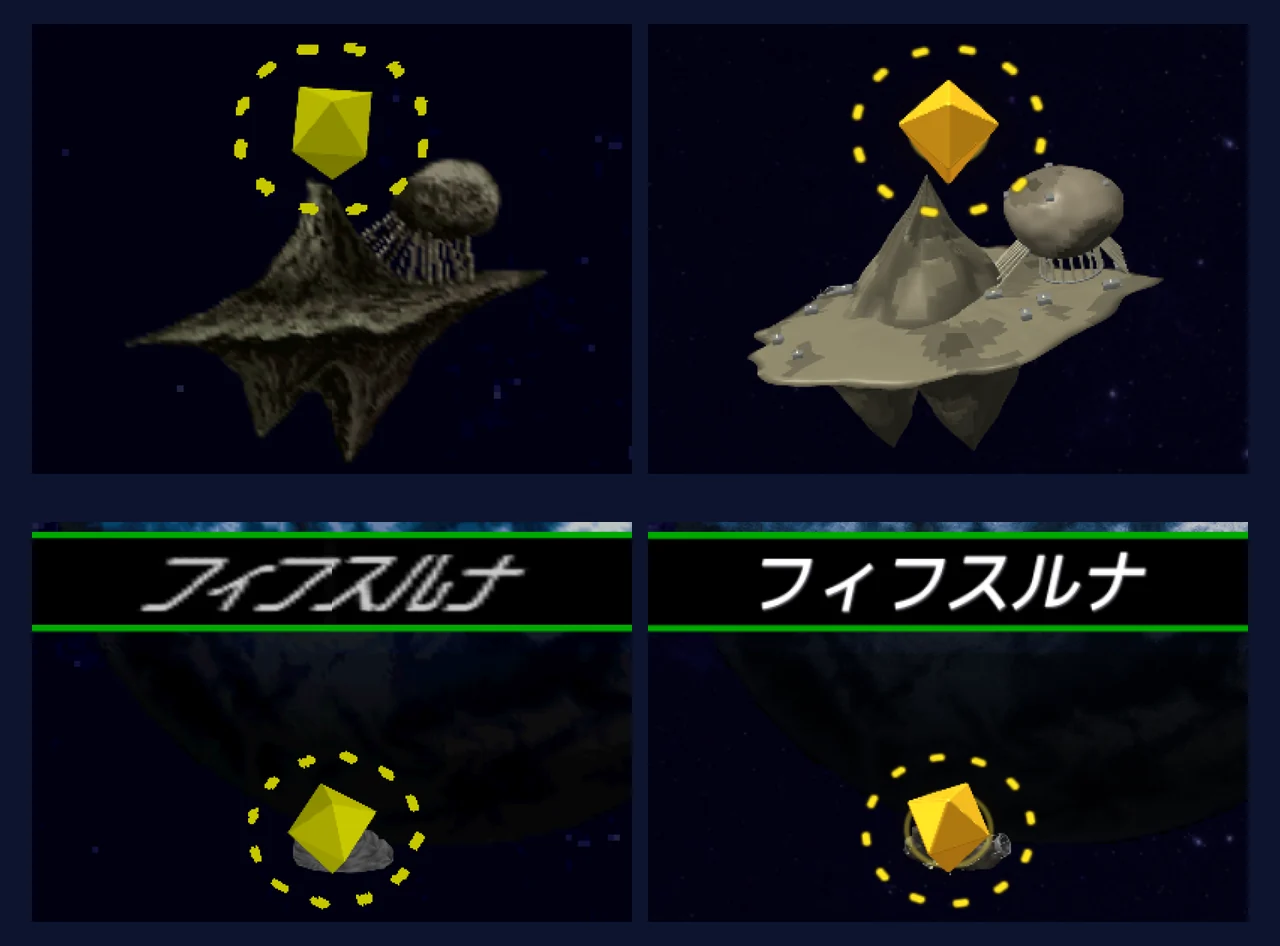
Top: Axis. Bottom: Fifth Luna and its name plate. Original left, HD right.
- Landmarks: Axis and Fifth Luna were rebuilt using the same process, bringing the total to 15 models with the 13 ships.
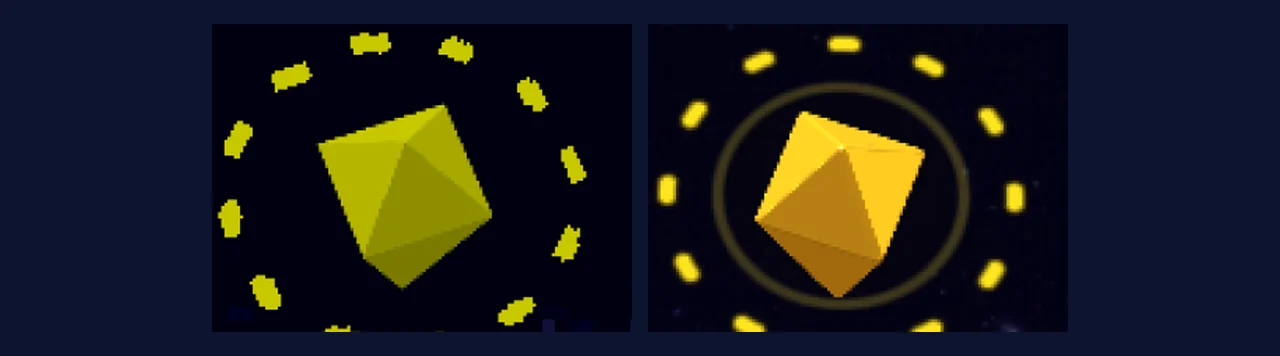
The yellow diamond that marks a location, original left, HD right.
- Location marker: the original double-pyramid shape has rounded edges and a reflective gold material. A shader draws the dashed ring around it.
- Anti-aliasing: these models are drawn with the rest of the scene using 4× multisampling (MSAA) for smoother edges.
- The pack contains the rebuilt geometry for these native replacement models.
Tactical maps
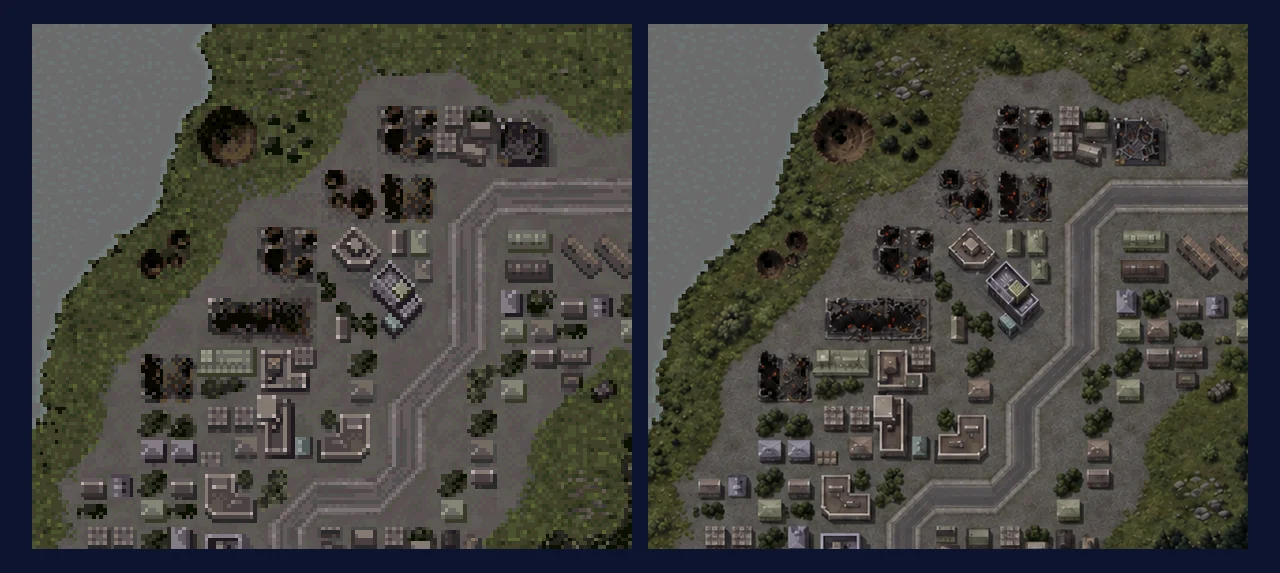
The town on map 20. Left: original, enlarged pixel for pixel. Right: the HD base.
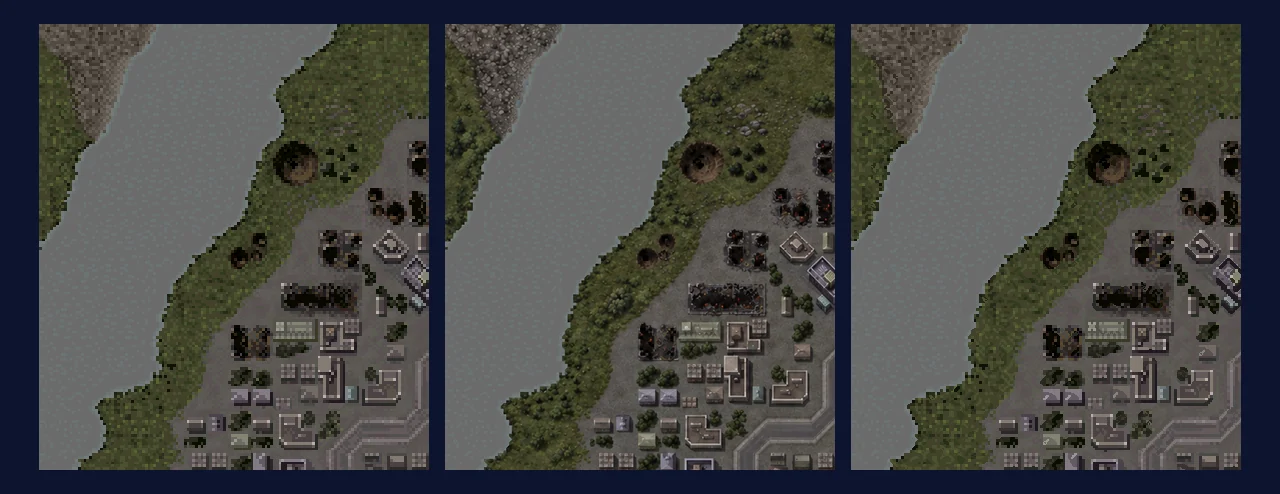
Left to right: original, HD base, palette-index map (shown with the original palette). At run time, the index map and live palette tint the base to animate water and change the colours of night maps.
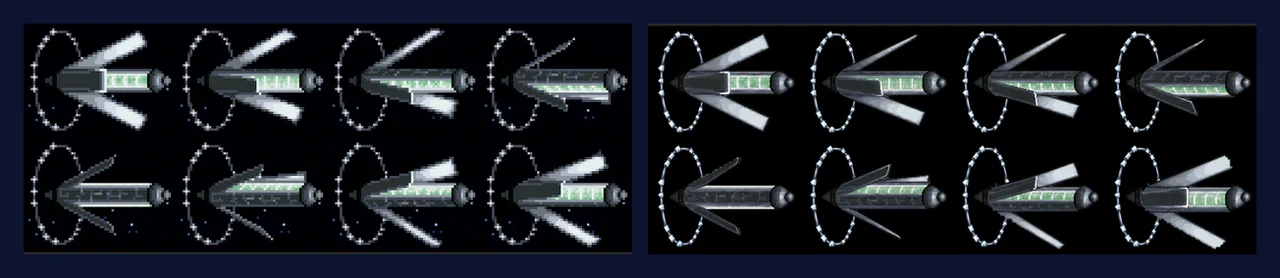
The space colony’s 8-frame animation, original left, HD right.
Tactical maps were the largest part of the work: 158 records, 109 root maps and 22 variants, with 131 maps in use.
- Generation: most maps exceed Qwen’s 2048×2048 limit at 4× size, so every base was painted with OpenAI’s image model. The process used 109 whole maps as bases, then 772 detail windows (each covering 384×256 original pixels, aligned to the grid and checked cell by cell), and 50 more windows for the variants: over 900 pictures in all.
- Water and lighting: the original cycles palette colours to animate water and lights, and swaps the whole palette for night battles. Water painted into the base would be static, so water and borders are left out of the paintings. Each base is paired with a 4× palette-index map, containing only the original colour indices enlarged with MMPX. At run time, the shader adjusts the base by the difference between the live and reference palettes, allowing water to flow, lights to blink and night maps to change colour.
- Colony: the space colony uses an 8-frame animation with its own sheet.
- Result: 131 bases (map 20 is 1792×2048), each with an index map, rendered through whole-image drawing.
Unit art
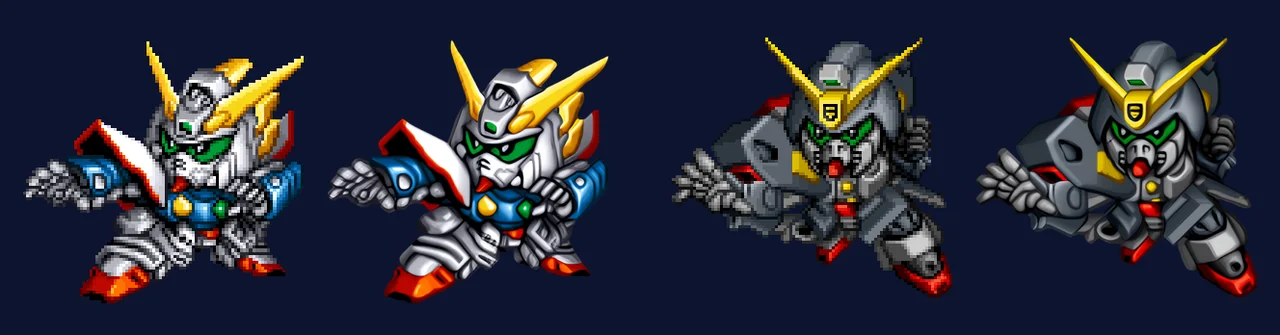
Left: original, 96×96. Right: HD.
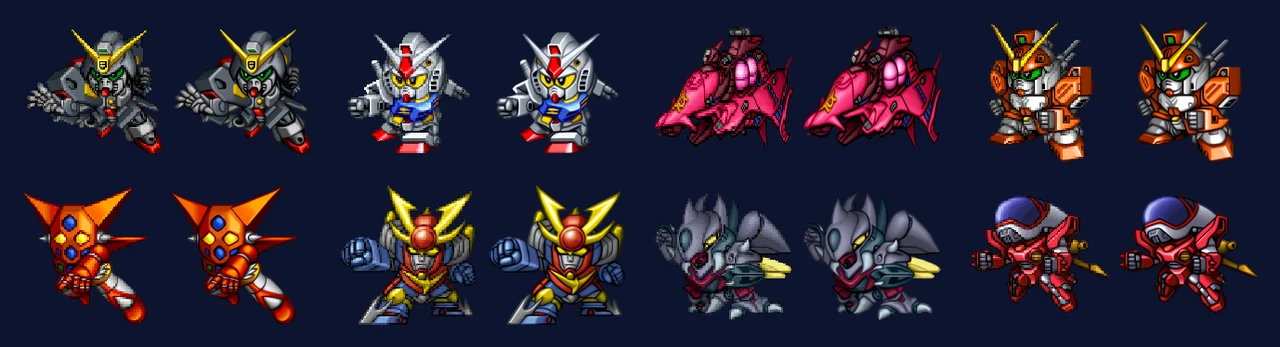
Eight more units, original left, HD right in each pair.
- Original: 332 unit poses, mostly 96×96 or 128×128.
- Upscaling: we tried Qwen Pro, but its copyright filter blocked some units and redraws changed details. We then compared 14 local upscaling models and chose 4x-UltraSharpV2 and 4x-PixelPerfectV4 blended half and half. Two passes produce a 16× image, which is then reduced to an 8× master. Alpha passes through the model separately, followed by edge cleanup.
- Result: shipped at 6×, with a maximum long edge of 1024 pixels. The pre-battle and unit pages display the images directly, while battle scenes replace the original sprites frame by frame. The original stores 134 poses mirrored; the vertex data identifies the required flip so the HD units face the same direction.
Map unit icons

Left: original, 16×16. Right: HD, 64×64.

One HD icon in the four faction colours.
The map icons are only 16×16. We wanted to make them easier to read while retaining their pixel-art style.
- Pipeline: MMPX 2× → 4x-PixelPerfectV4 → hard quantisation back to 32×32 using only the original colour indices (nearest in CIELAB) → MMPX 2× again, producing a 64×64 index map.
- Other approaches: Qwen introduced new shapes, and smooth redraws lost the pixel-art appearance. Dithering, xBRZ (GPL), Scale4x and several other approaches were also set aside.
- Faction colours: these come from the palette, so each icon is generated once per faction. After removing duplicates, there are 1,256 images, applied through texture replacement.
Battle scenes
Battle scenes combine several layers, each drawn differently in the original. That made them the most finely divided part of the HD pack.
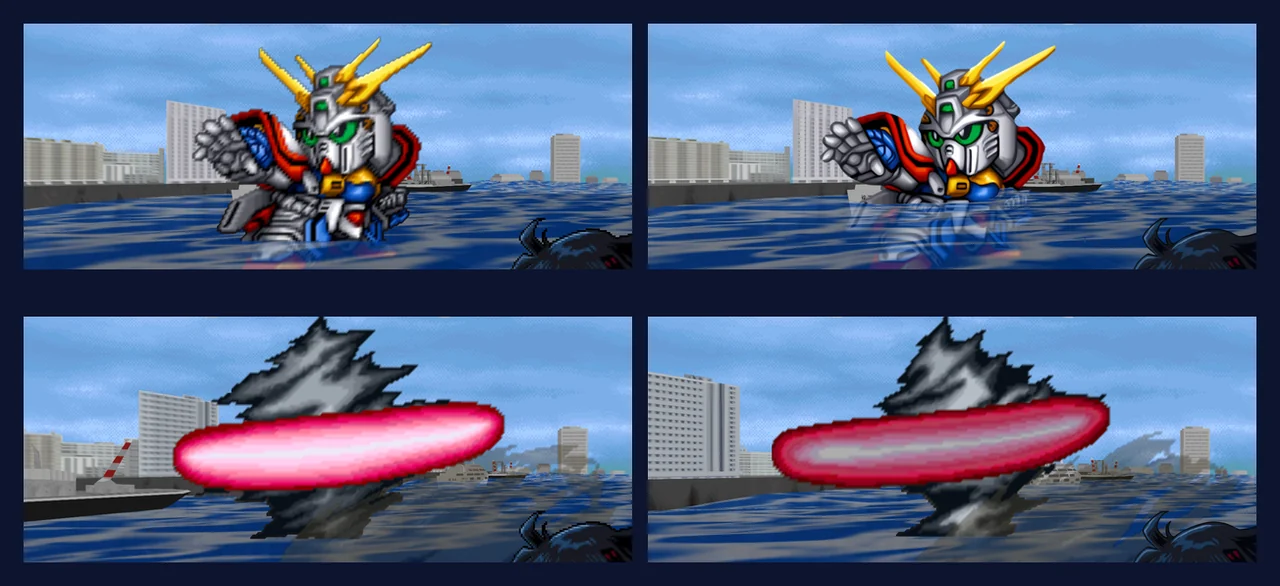
0.3.5 in game (God Gundam against Master Gundam, at a harbour). Original left, HD right in each pair. Top: the unit uses HD art, and the sea and buildings have HD textures. Bottom: the attack effect remains original.
Battle layers
| Layer | How the original draws it | What HD does |
|---|---|---|
| Sky, starfield | 32×32 tiles, wrapping every 320×240 | Uses the original |
| Ground | 3 blocks × 3 rows of 3D models, textured by the renderer | Replaces 1,419 textures at 4× |
| Units | Parts of an atlas stacked into a frame by a part table | Replaces whole frames with HD unit art |
| Extra unit images (afterimages, transformations, recolours) | The same atlas and part-table system | Derives or redraws 196 frames |
| Cut-in close-ups | The same atlas and part-table system | Upscales locally and redraws small faces; 308 frames (208 unique) |
| Weapons and props | The same atlas and part-table system | Upscales locally; 431 frames (394 unique) |
| Attack effects, explosions, speed lines | Sprites with palette animation | Uses the original |
| HP and dialogue window frames | Texture slices | Redraws them in code (see “Frames” below) |
Units, extra images, cut-ins and props all use the same structure: a part table assembles small pieces from an atlas into a frame, with each piece drawn as a quad that moves and scales with its node’s matrix. The HD renderer identifies the scene, atlas, palette and frame, suppresses the individual pieces, and draws one complete HD image in the same place with the same transform.
Units
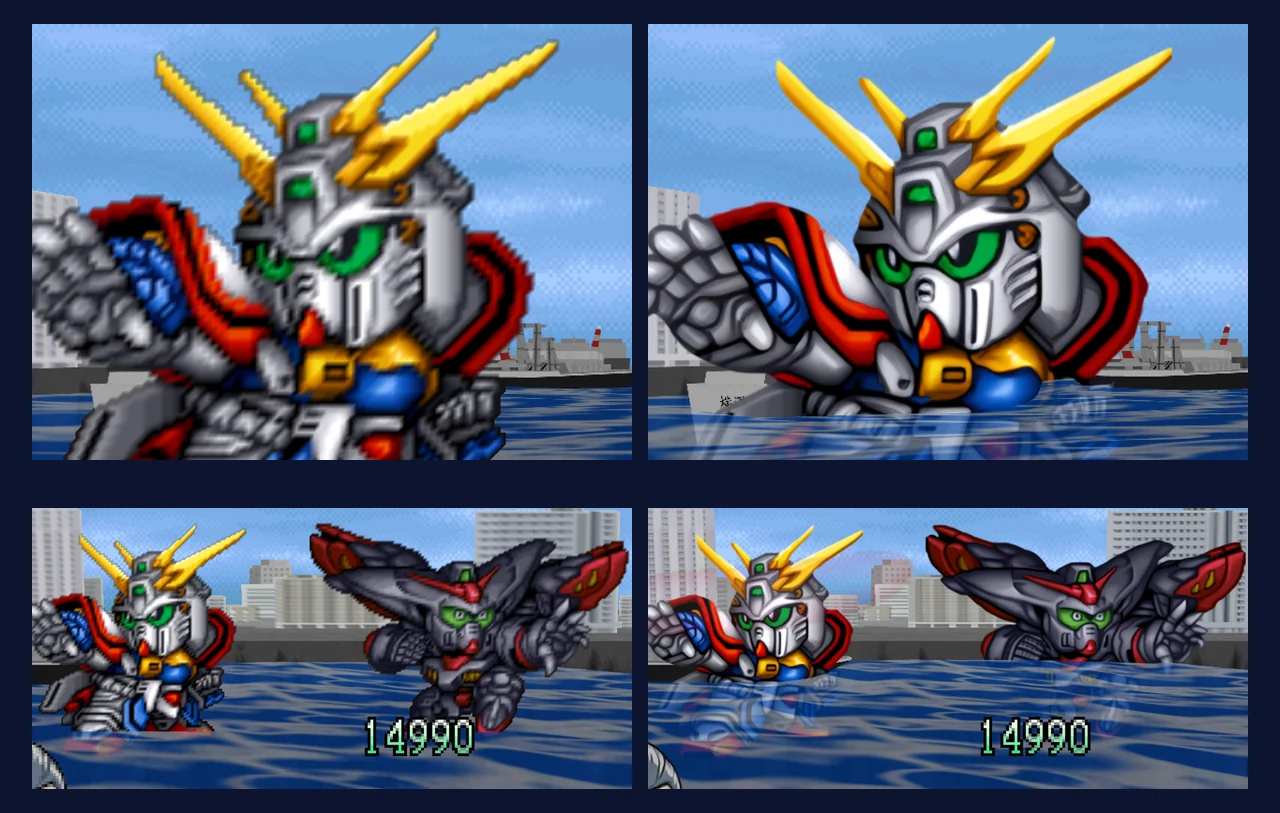
Units in battle up close, original left, HD right.
- Battle scenes use the same 332 HD unit images as the pre-battle page.
- The original stores 134 poses mirrored, with every part flagged as flipped. The parts’ vertex addresses identify the mirrored set, allowing the HD art to face the same direction.
- Hit flashes use two methods in the original. An in-place palette rewrite leaves the HD image’s colours unchanged. A switch to another palette resource produces frames the HD renderer does not recognise, so those frames use the original graphics.
Extra unit images
Unit atlases also contain afterimages, transformation frames, recolours, funnels flying out and other variations. We compared them with the standing poses and grouped them into six categories:
| Kind | Count | Method |
|---|---|---|
| Unchanged pose | 6 | Reuses the HD art |
| Recoloured or glowing | 11 | Recolours the HD art with a colour lookup |
| Afterimages and break-up effects | 8 | Derives the image from the HD art, estimating row offsets line by line |
| Pose with funnels flying out | 2 | Combines the HD art with the funnels |
| Partly changed pose, with added elements | 47 | OpenAI’s image model paints the changed part; the rest comes from the HD art |
| Completely new picture | 15 | Redraws it with OpenAI’s image model |
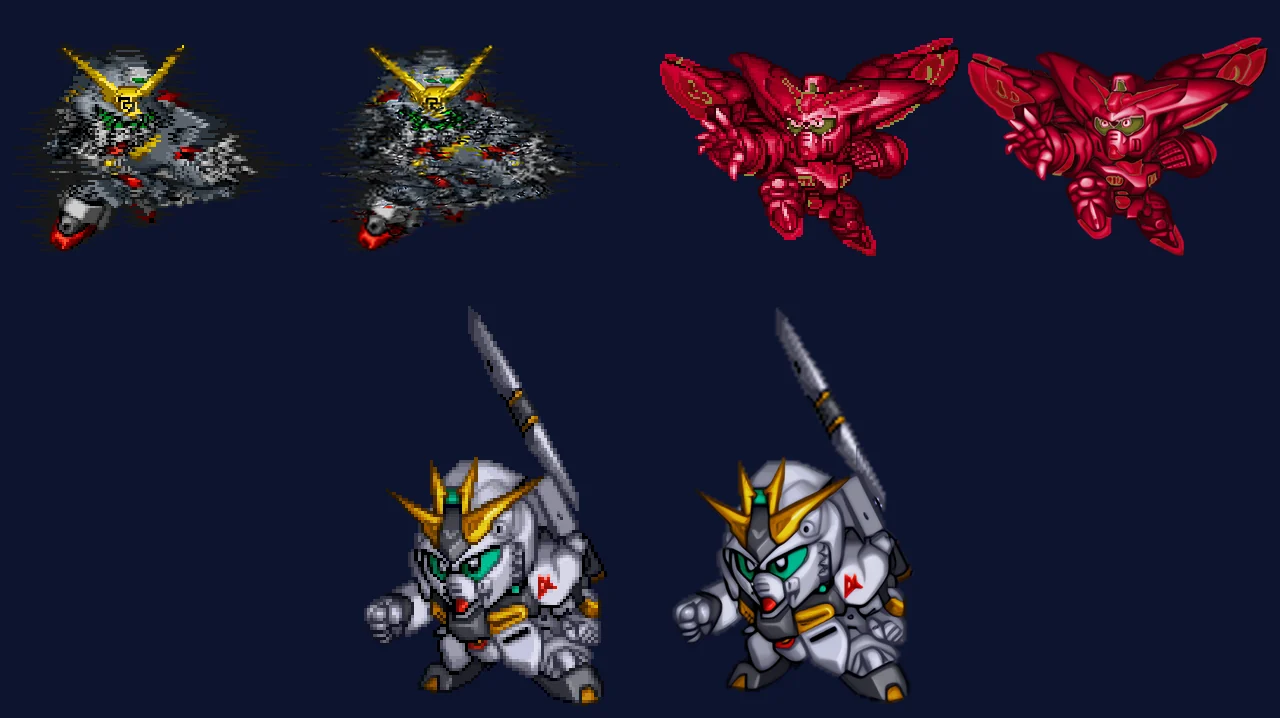
Derived from the HD art: afterimages (Gundam Spiegel), a recolour (Master Gundam S), funnels flying out (ν Gundam). Original left, HD right in each pair.
- Derived images: pixels that match the standing pose use the HD art. Colour changes are applied through a colour ratio or lookup; new pixels absent from the pose are upscaled from the original, and empty pixels remain transparent. A single-hue glow maps the pose’s brightness to the target colour.
- Recolouring: some ratio-based recolours blurred details, so 8 were changed to use a colour lookup. Where the original frame and pose overlap, each pose colour is mapped to the target colour it most often becomes.
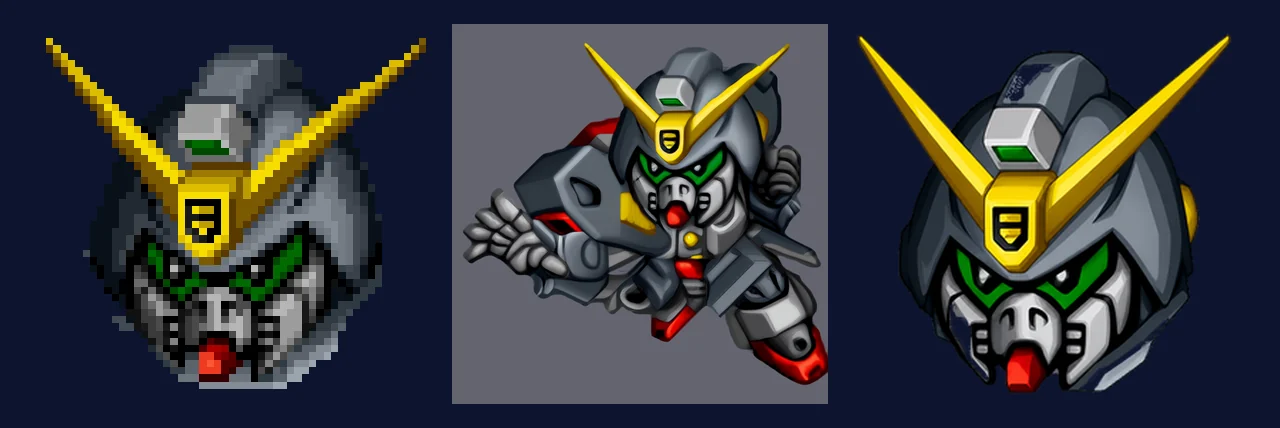
Left: the original frame. Middle: the style reference given to the model (the HD art in the same colours). Right: the result.
- Redrawing: 62 pictures were sent to OpenAI’s image model, each with the original, the HD art in matching colours and an individual prompt. The results were aligned and matted to the original frame’s outline as 8× masters. For partly changed pictures, a mask selects the grey areas from the HD art and the red areas from the generated picture, with a feather width of one original pixel.
- Multi-frame animations: one frame is drawn, and the others are derived from it.
Cut-ins
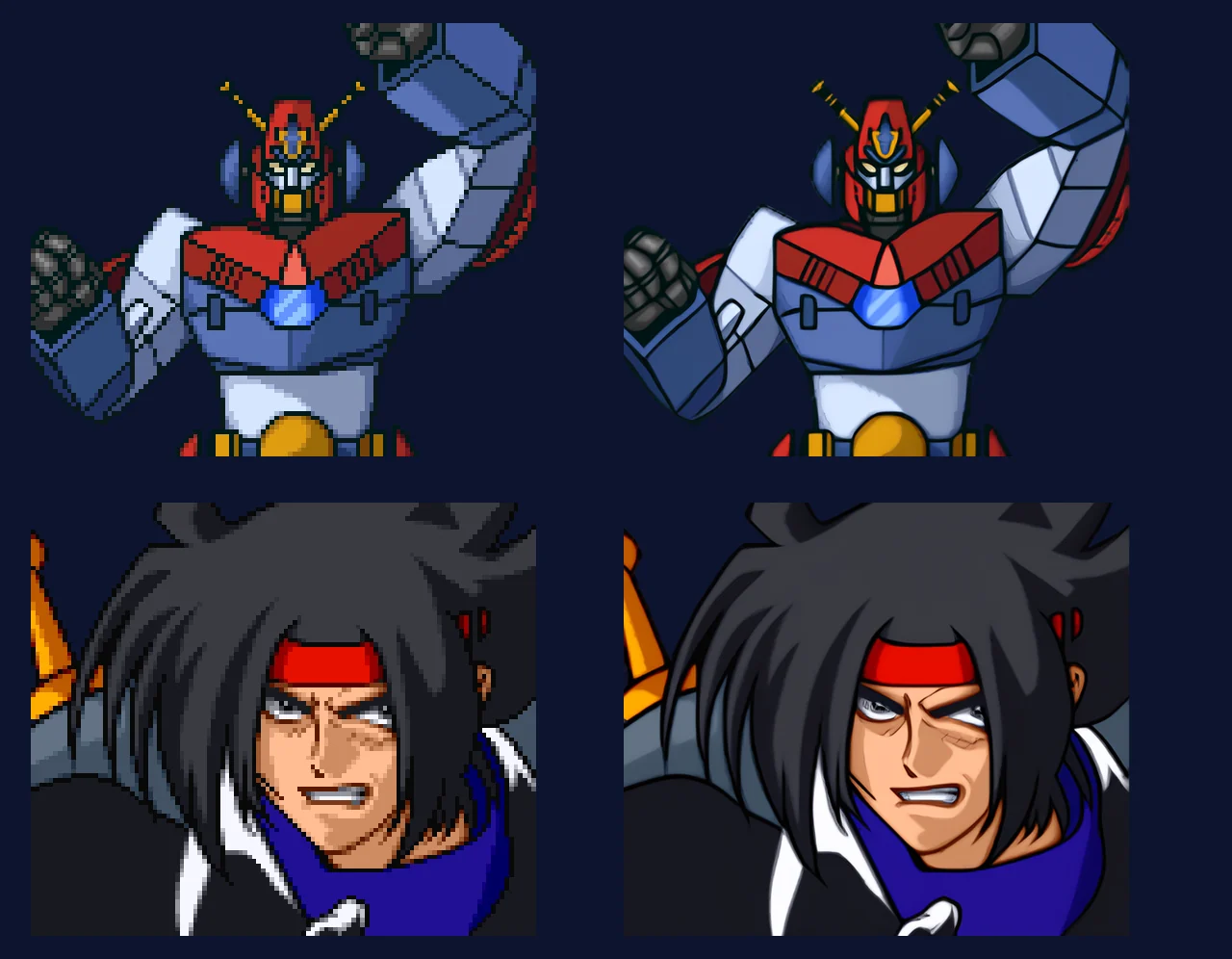
Local upscaling works well for a unit and a large face. Original left, HD right.
- Scope: 55 close-up scenes, 308 frames (208 unique). Each frame is rendered from its part table, cropped to the parts’ bounding box and upscaled with the same local process as the unit art.
- Small faces: when a face occupies only 6–20 original pixels, the upscaler invents features.
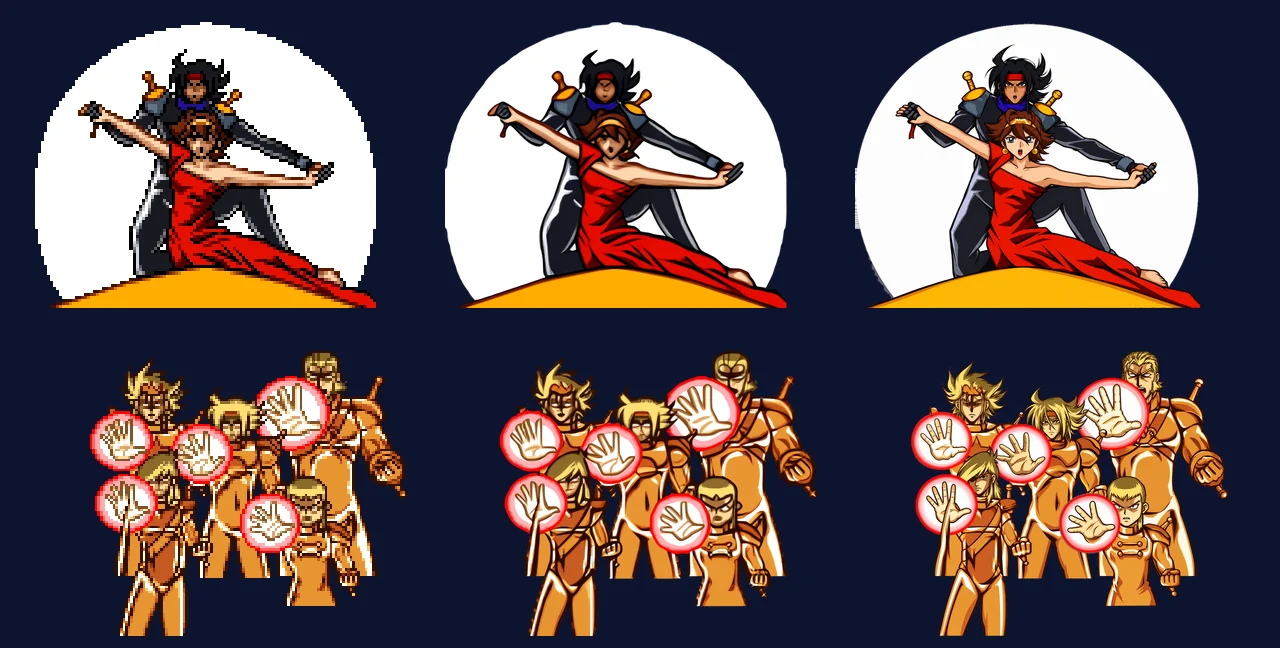
Left: original. Middle: upscaled locally. Right: redrawn. Local upscaling smears the faces of the five figures in the bottom row.
- Redrawing the atlas: every cut-in frame is a crop from a complete drawing stored in the atlas. A pan, or an animation of figures gathering, moves that same drawing. We sent 10 complete drawings to OpenAI’s image model, then aligned and matted the results and placed them in an 8× atlas. From there, 36 frames were rebuilt using the original part tables, including stacking order and horizontal flips.
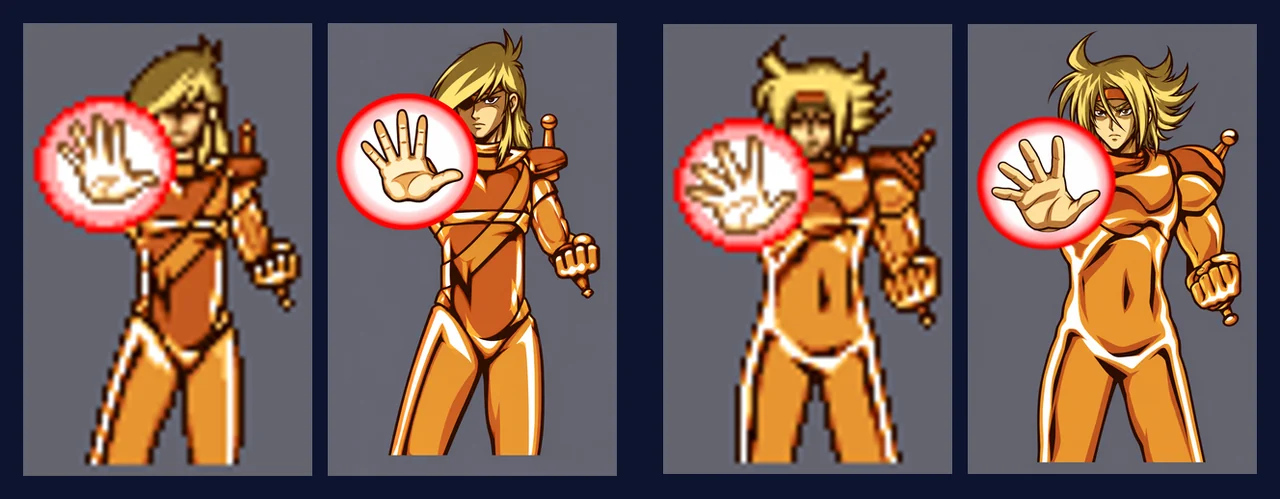
The complete drawing stored in the atlas (left) and the redraw (right).
- Details: one frame overlays 5 eye patches taken from elsewhere in the atlas, each 15×7 pixels. The rebuild leaves out those patches and paints the eyes separately. Large-face close-ups already matched the original well after upscaling, so those were kept without redrawing.
Weapons and props
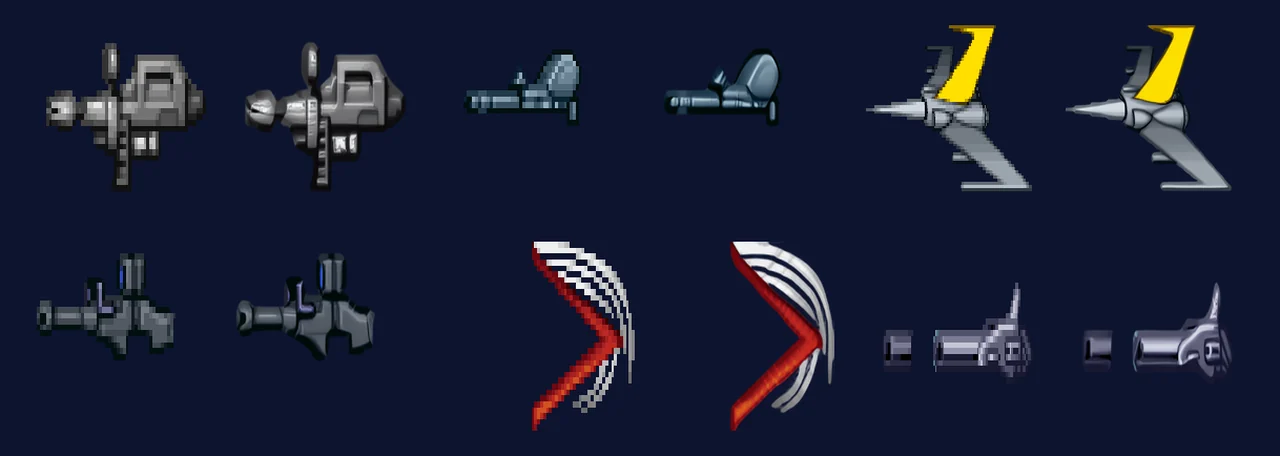
Weapons and props, original left, HD right in each pair.
The remaining images in the unit atlases are treated as props: 289 scenes, with 431 frames (394 unique), covering rifles, beam sabres, shields, fists and similar items. They use the same upscaling process and are packaged with the cut-ins.
Ground

Battle ground textures. Left: original, 64×64. Right: HD, 256×256.
- Scale: 424 3D ground models with 1,419 textures.
- Offline texture hashes: replacement textures need the hashes assigned by the renderer. We simulate how the display lists load textures into the 4 KB texture memory, including word-swapping on odd rows and copying palettes four times, then hash the result as RT64 does. All 16 hashes captured from a running game in the pilot matched the offline results.
- Upscaling: each texture is extended by 16 pixels according to its wrapping mode, then upscaled 4× to avoid seams between tiles. Noisy textures such as grass and gravel have a slightly painterly result, which we kept.
Battle asset sizes and remaining coverage
- Pack size: whole frames used only in battle are packaged at 5× the original. Units are scaled to 80–110% in battle and cut-ins to about 129%, so at the default 4× internal resolution, one original pixel covers about 3.2–5.2 screen pixels. We chose 5× for the pack and keep the 8× masters locally.
- Original graphics still in use: skies and starfields; attack effects, explosions and speed lines, whose palette animation would be lost in a fixed HD image; and the hit-flash frames described above.
Frames, the title and story screens

Left: original. Right: HD.
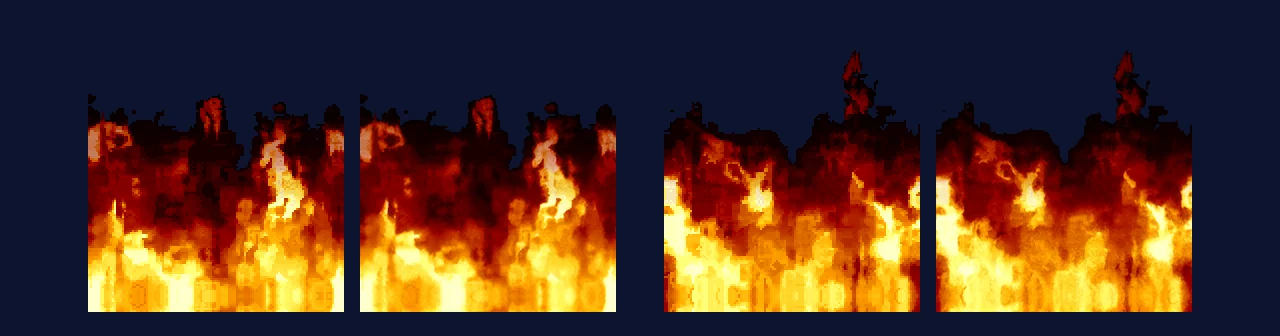
The title screen’s flames (2 of the 16 pieces), original left, HD right in each pair.
- Dialogue and HUD frames: 13 dialogue frame slices and 17 battle HUD slices, redrawn in code from the original design (16 pixels to 64) and applied through texture replacement.
- Window frames, BANPRESTO, GAME OVER: generated at run time from your ROM, without AI, and excluded from the HD pack. Window frames use anti-aliased strokes with rounded caps and the original colour indices, preserving the animated light that runs along the frame.
- Title logo and flames: made with Qwen, with colours locked. The flames are cut into 16 pieces that loop seamlessly.
- Image-based text: the title menu, 133 chapter cards, the prologue, the ending and the credits are typeset in the current language, replacing the original Japanese text images.
Pack size and formats
The 0.3.5 HD pack contains 6,795 files: 505 MB zipped and about 540 MB unpacked. The largest parts are the tactical maps (246 MB) and the PNGs for texture replacement (161 MB).
- Whole images use JPEG at quality 92, with a separate alpha PNG where transparency is needed. Index maps, animation frames and replacement textures remain PNG, since RT64 accepts only PNG and DDS.
- Unit art is reduced from 8× to 6× because the pages display it at about 1,000 pixels at most.
- BC7 texture compression introduced blocks in world map close-ups, so we did not use it. Sampled quality (PSNR): unit art 44 dB, portraits 42 dB, maps 41 dB.
Where AI was used
The pack combines image generation, local upscaling, modelling and code-drawn assets:
- Alibaba Cloud Qwen image models (qwen-image-3.0 / 3.0-pro): character portraits, intermission backgrounds, space objects, the title logo and flames.
- Alibaba Cloud Wanx (wanx2.1-imageedit): extending the intermission backgrounds to 16:9.
- OpenAI’s image model (through Codex): the story world map, tactical map bases, and some battle cut-ins and extra unit images.
- Local upscaling models (4x-UltraSharpV2, 4x-PixelPerfectV4, plus MMPX pixel scaling): unit art, map unit icons, battle cut-ins and props, battle ground textures, and tactical map index maps. These are enlarged directly from the original pixels.
- Modelling, code and typesetting: ship, landmark and marker models (modelled in Blender), dialogue and HUD frames (drawn in code), window frames and logos (generated from your ROM at run time), and all text (native typesetting). These assets were made without AI image models.
AI-generated and upscaled images use the original graphics as references and are individually aligned to the source composition. This is an unofficial fan project; the original characters and artwork belong to their respective owners.