
HD pack 1.2 comes out with 0.5.0. The main change is the unit icons on the map; the other changes are few, but all of them are things players see.
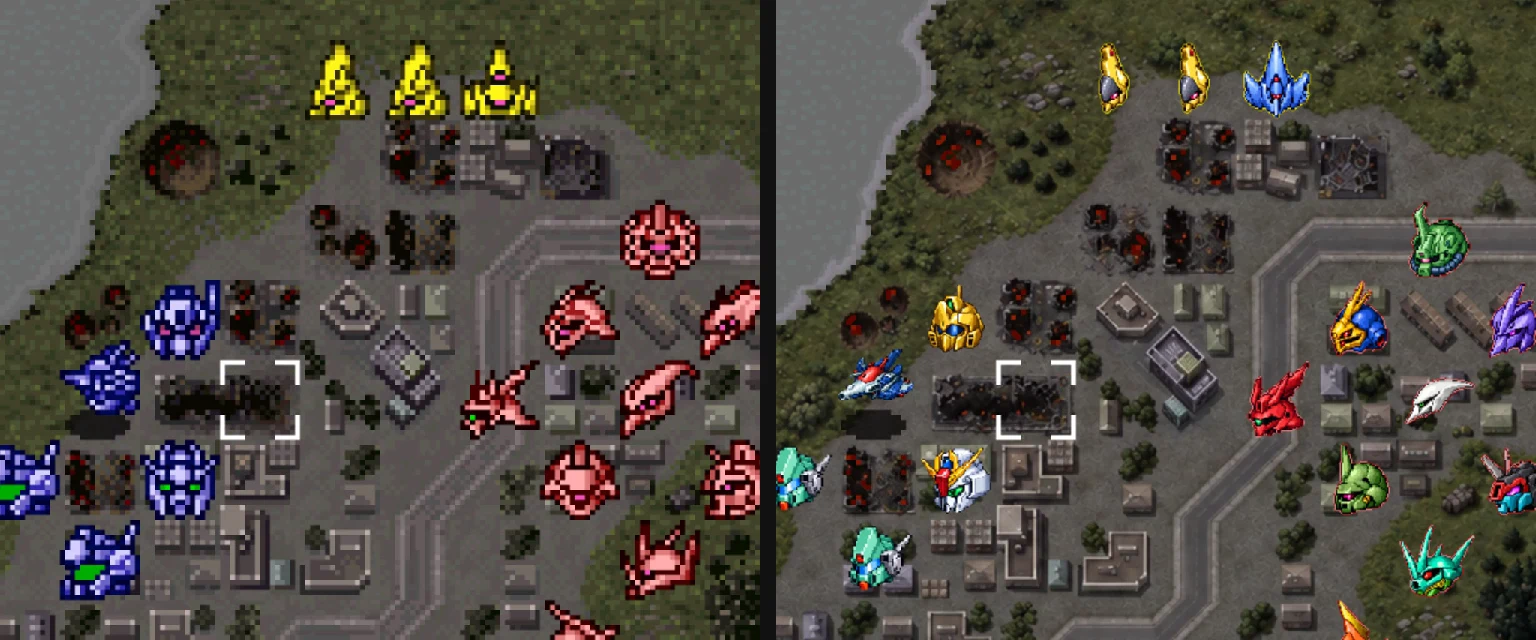
The same map, the original on the left and HD 1.2 on the right
Map unit icons
The original map icons are 16×16 pixels, each a close-up of the unit’s head (a ship is the whole ship seen from above). HD 1.1 upscaled them to 64×64 with upscaling models, keeping to the original’s colours. That kept the pixel-art look, but 16 pixels hold very little, and many units were still hard to tell apart. 1.2 redraws them one by one:
- The units’ own colours: the original icons tell the sides apart by palette, tinting the whole icon blue, red or yellow. The 1.2 icons keep each unit’s own colours; enemies and third parties get a 2-pixel ring in their side’s colour, and your units none.
- Acted units turn grey: as in the original, a unit’s icon turns grey once it has acted.
- Matched to the original one for one: each replaces one of the original icon textures, the game’s logic is untouched, and F6 switches back to the original at any time.
How the new icons were made
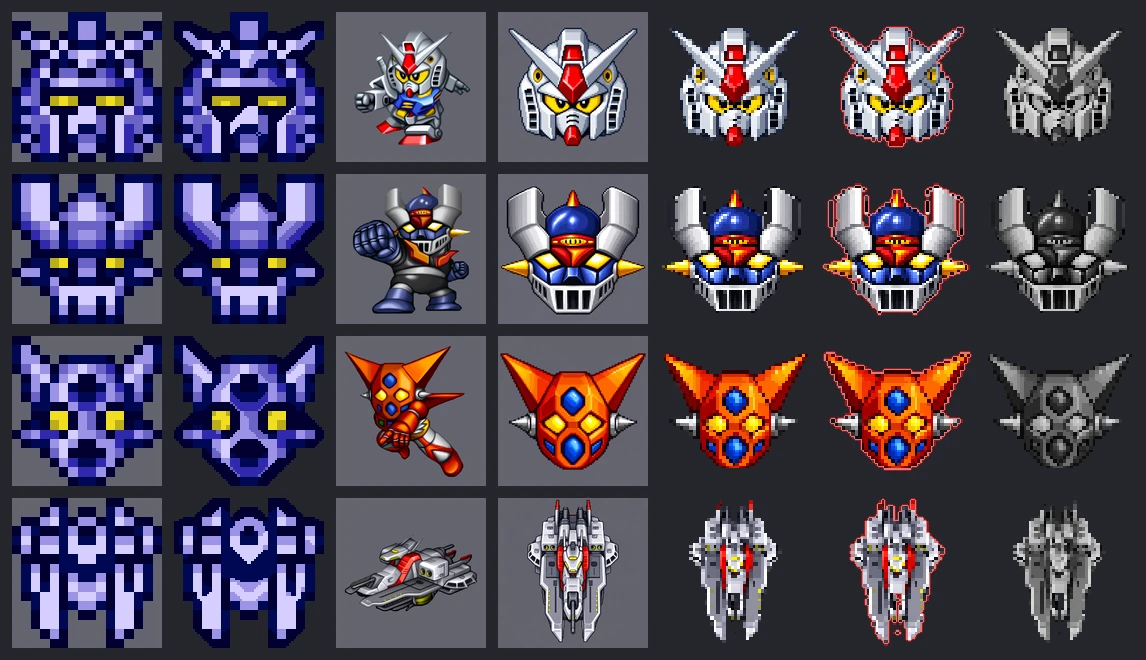
One unit per row. From left to right: the original 16×16, HD 1.1, the HD unit pose (reference), the image model’s output, HD 1.2 for your side, an enemy, and acted
- Two references: each unit gets two pictures. The original icon decides what is drawn, which way it faces and how much of the space it takes; the HD unit pose decides the shapes, colours and details. The original icons show the head, so the new ones are the head only, down to the chin or the bottom of the helmet, with no neck, shoulders or backpack; aircraft, flying forms and ships are the whole craft, as in the original.
- Drawn as pixel art: OpenAI’s image model (through Codex’s image_gen) draws each as pixel art on a 128×128 grid: one flat colour per cell, no anti-aliasing or gradients, a dark outline, light from the upper left. Nine samples came first; once their style was settled, the other 311 followed. Each unit’s prompt adds what is particular to it, such as which way it faces and which parts to leave out.
- Checked one by one: a review page puts each unit’s original icon, its pose and the new picture side by side, and marks problems such as “facing the wrong way”, “extra parts” or “missing parts”. Those were drawn again: a few that turned a profile into a front view, and Domon’s profile among them. A few units have no battle pose of their own in the original (a placeholder borrows another unit’s), so the original Getter map animation or the character portraits served as references for them.
- Back to pixels: the model’s output is a 1254×1254 picture. Reading one colour per cell off the model’s own grid turns it back into 128×128 pixels; only the grey background connected to the edge of the canvas is removed, so each icon keeps its place on the canvas.
- Into the game: each original icon has four palettes: your side, enemies, third parties and acted. So each unit gets four pictures: yours as drawn, enemies and third parties with a 2-pixel ring (one light, one dark), and acted in greyscale at 85% brightness. Each replaces the original icon texture with that hash in the renderer, 1256 in all. Six pairs of icons have identical pixels in the original (the white and the Titans Mk-II, for example); each pair shares one picture.
Fixes
The world map’s repeated tiles
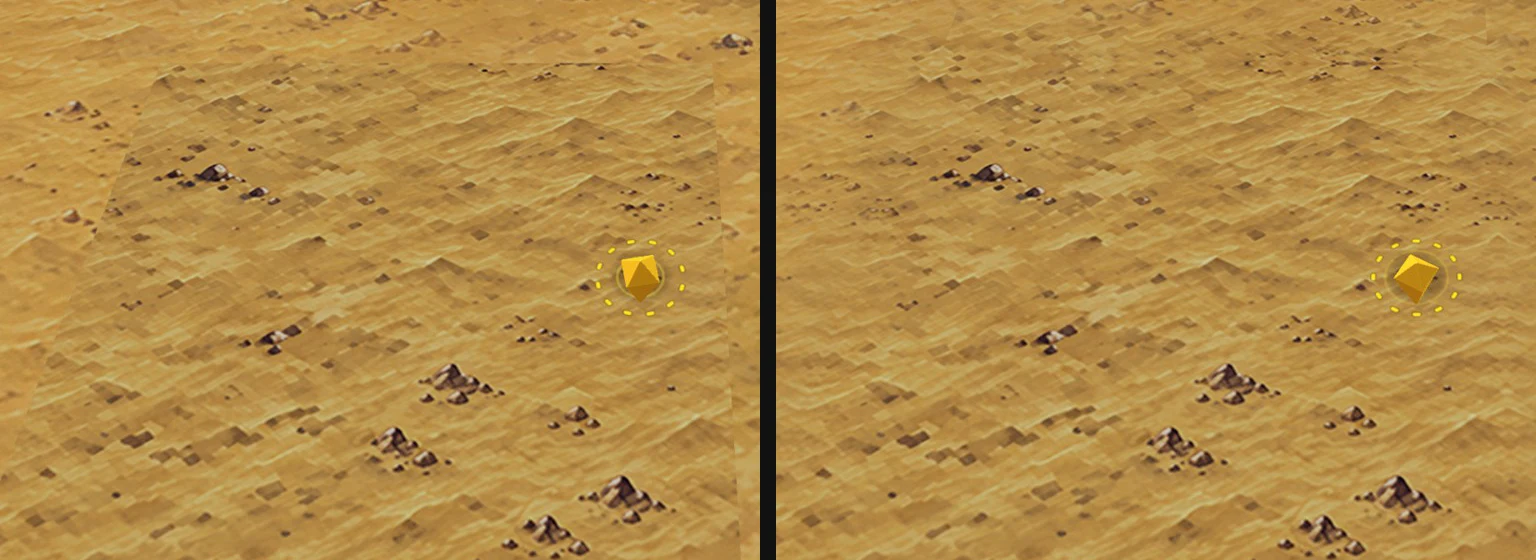
Near the Iranian plateau. On the left only the redrawn tile is in place, and its square still shows; on the right is 1.2, blended into the tiles around it
The original reuses two tiles of the story world map many times (a stretch of a northern edge and the Iranian plateau). The land around them differs from place to place, so no single HD picture fits them, and they were left original, showing as squares among the HD surface. 1.2 draws a seamless HD tile for each, matched to the colours around it, and blends the surrounding tiles toward it, so the seams are all but gone.
GoShogun’s Go Saber and Space Bazooka

The left two before the fix, the right two in 1.2
These two weapons showed as white silhouettes in battle (#15). In the original, their colours are filled in during the battle by a palette animation; the palette itself holds white placeholders. The HD pictures were exported with the static palette and came out white. They are now exported with the colours the battle shows. We checked every battle sprite, and only these two had the problem.
Unit poses and portraits
Flaws in some of the pictures touched up.
The Switch’s HD pack
The Switch has an HD pack of its own, Marchwind64-HD-1.2-switch.zip. Its pictures are the same as the desktop pack’s, converted ahead of time into formats the Switch’s GPU reads directly, which makes it larger; the desktop pack does not work on the Switch. Extract it to the SD card’s root to get /switch/Marchwind64/hd/.
Download and install
- Desktop and Android: download
Marchwind64-HD-1.2.zipfrom the install page and replace the oldhdfolder with it; on Android, import the zip in the app. An older HD pack still works, without the changes above, and the game’s update check says there is a new one. - Switch: download
Marchwind64-HD-1.2-switch.zipand extract it to the SD card’s root. - Both are also on the GitHub HD 1.2 release.
The new map icons, the two redrawn world map tiles and the touch-ups to the unit poses and portraits were drawn by OpenAI’s image model (through Codex’s image_gen) with the original graphics as reference, and are AI-generated. How the rest of the HD pack was made is in Making the HD art.